 gradatimo
A good guide makes
the next step obvious.
Explore this self-contained example using a captured InDesign screen. Select a step, follow the marker, and read the instruction.
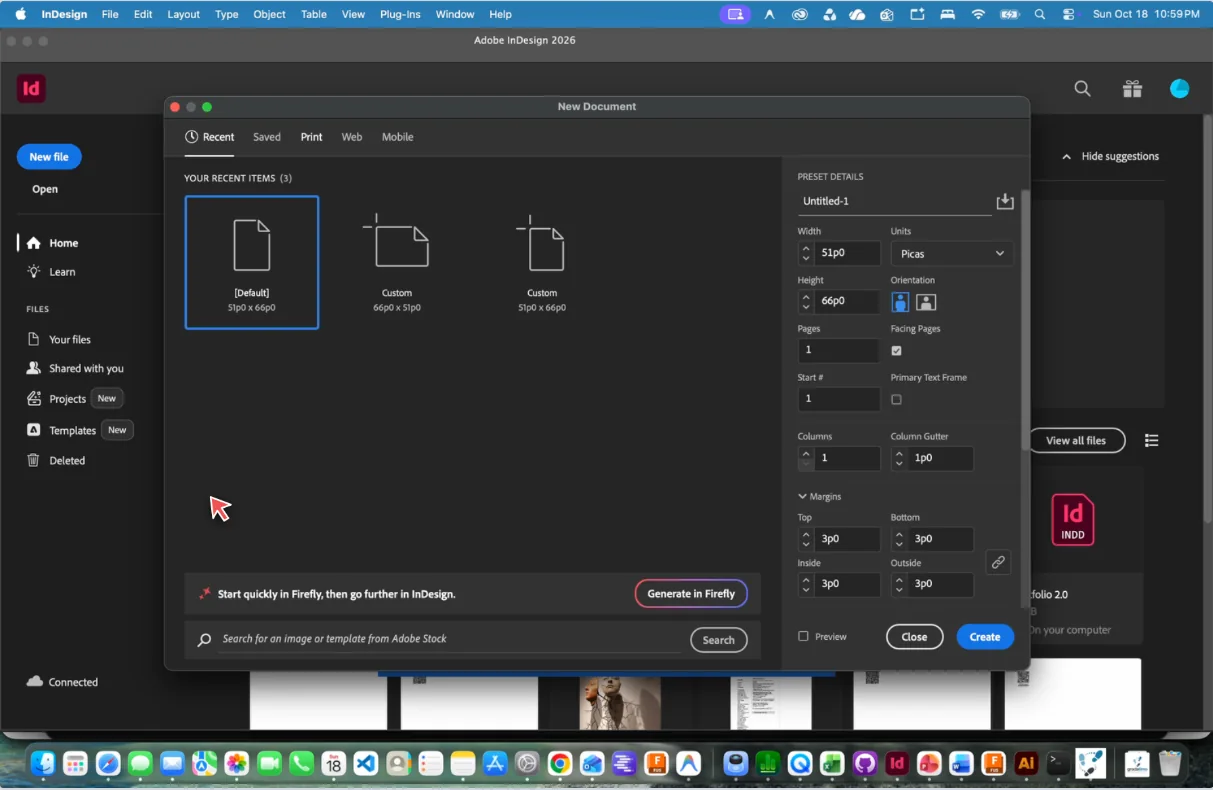
1. Select the Print tab
In Adobe InDesign’s New Document window, choose the Print category to start with print-oriented document settings.
Use the lesson buttons to jump between steps
This lightweight demo shows the principle of screenshot markers and sequential instructions. It is not a native Gradatimo export or a representation of every player capability.
Beyond the example
Make the guide your own.
Gradatimo supports more than software screenshots. Include illustrations, photographs, text-only steps, attachments, and entire lessons in a reusable project.
Import photos
Teach physical workflows, materials and creative techniques with real images.
Explain more
Give the why, not just the click sequence, in a dedicated instruction editor.
Grow the lesson
Turn a short demonstration into a complete guide as your content develops.
Make knowledge visibleMake it once.
Make it once.
Teach it clearly.
Capture, refine, and organize instructions in one place. Publish the guide that fits your audience.